Glutide: a food and dose log for people on GLP-1 medication

Glutide is an app for iPhone and iPad. You log a meal by photo, by a sentence or by searching foods, and it adds up your protein, fiber and water for the day. You also log each dose, where you injected and any side effects. Everything is stored on your device and there is no account.

Download on the App Store

Free download for iPhone and iPad.

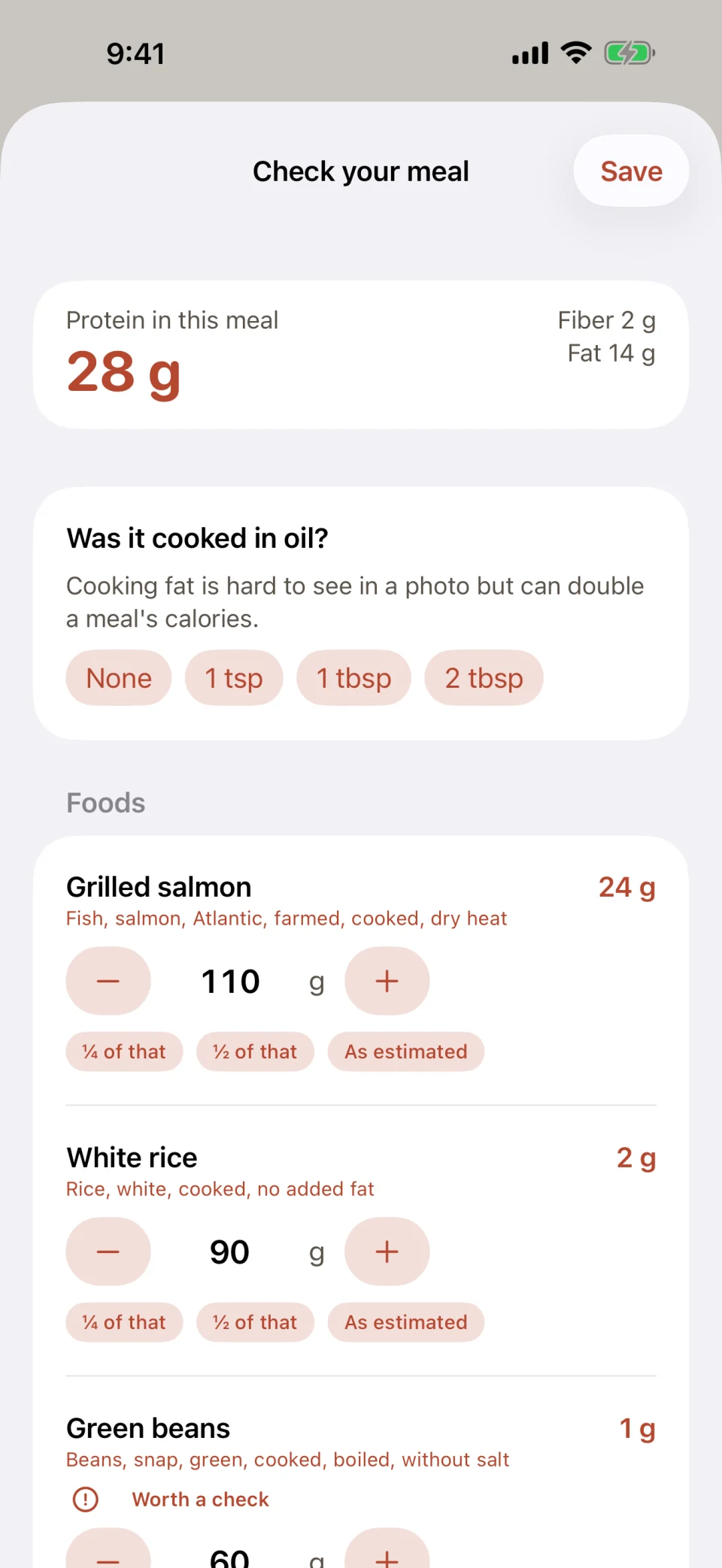
The Check your meal screen in Glutide after a photo of grilled salmon, white rice and green beans: 28 grams of protein in total, a question about cooking oil with choices of none, 1 tsp, 1 tbsp or 2 tbsp, and each food with a weight in grams that can be raised, lowered or halved.
The check screen after a photo of salmon, rice and green beans. Every amount can be changed before you save.

What it does

Glutide does two things. It adds up protein, fiber and water for each day, so you can see how far you are from your targets on days when you have eaten very little. It also records each dose with the medication, strength, injection site and time, along with side effects and weight, and shows all of it in a journal and in charts.

Calories are in the app if you want them, and you can hide them if you do not.
How do I log a meal?

On the Today tab, tap Log a meal and pick one of four ways: take a photo, choose a photo, describe the meal in a sentence such as “3 oz salmon and half a cup of rice”, or search foods.

A photo or description is analyzed in a few seconds. Glutide lists each food it found, an estimated weight in grams, and the USDA FoodData Central entry it matched. Change anything that looks wrong with the minus and plus buttons, type an exact weight, or tap “½ of that” if you only ate part. If Glutide asks whether the food was cooked in oil or butter, answer it. Cooking fat is hard to see in a photo and can double the calories of a meal.

When the amounts look right, tap Save.

Protein, fiber and water

The Today tab shows a ring for protein, with fiber and water next to it. Your protein target is suggested from your weight and goal when you set up, and you can change it to the number your care team gives you.

The journal lists every day with its protein total. Progress shows the last 14 days against your target, for example “Target reached on 5 of 14 days”.

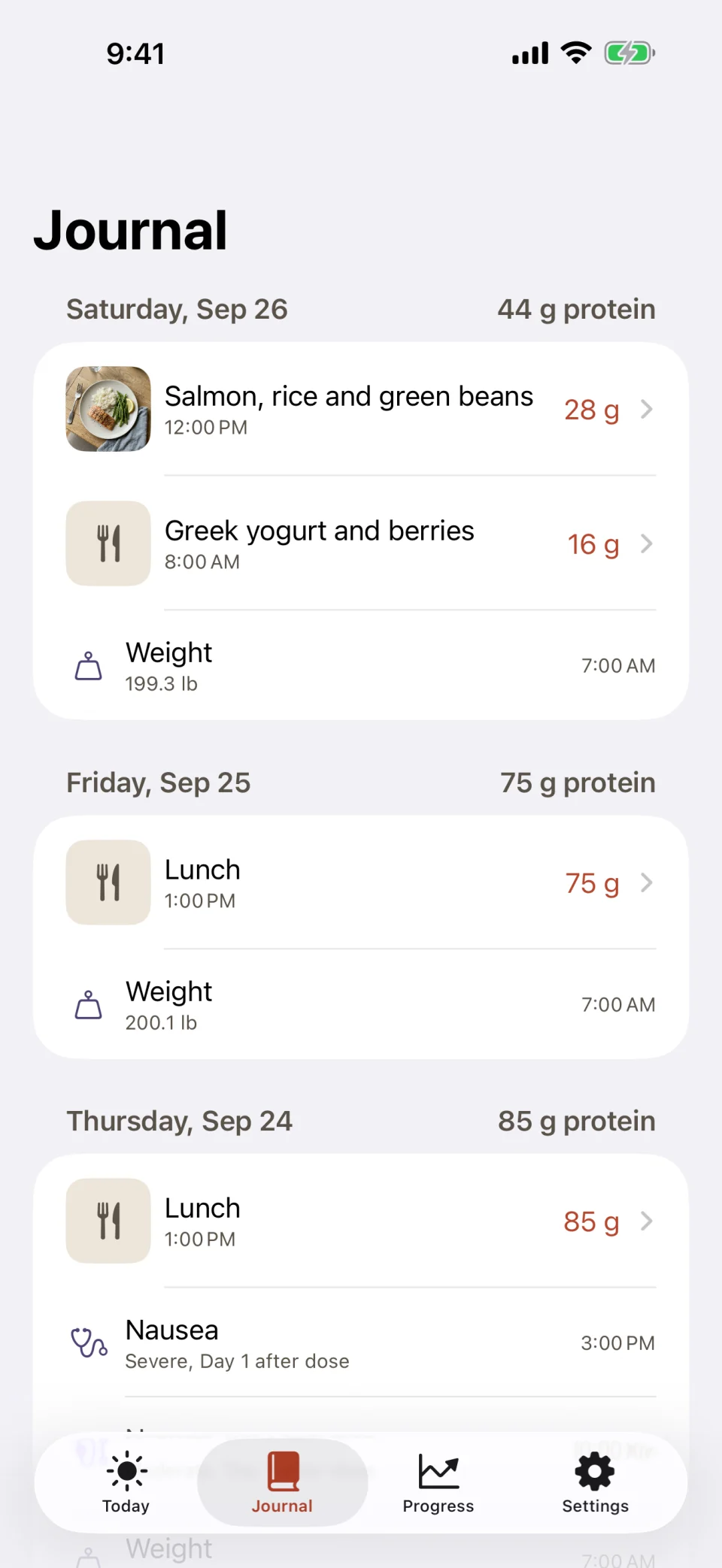
The Journal tab in Glutide: Friday with 44 grams of protein from salmon with rice and green beans and from Greek yogurt with berries plus a weigh-in, Thursday with 75 grams from lunch, and Wednesday with 85 grams from lunch and a logged nausea entry marked severe, day 1 after the dose.
The journal lists each day's meals with their protein, plus weigh-ins and side effects.

Doses and injection sites

For each dose you record the medication, which can be a brand such as Zepbound or Ozempic or a compounded medication, then the strength, the injection site and the exact time. It works for a weekly shot and for a daily pill.

The Today tab shows which day you last took a dose. Each dose in the journal shows its site, for example “Stomach, right”, so you can see where you injected last time. If you turn on reminders, they arrive at the time you choose.

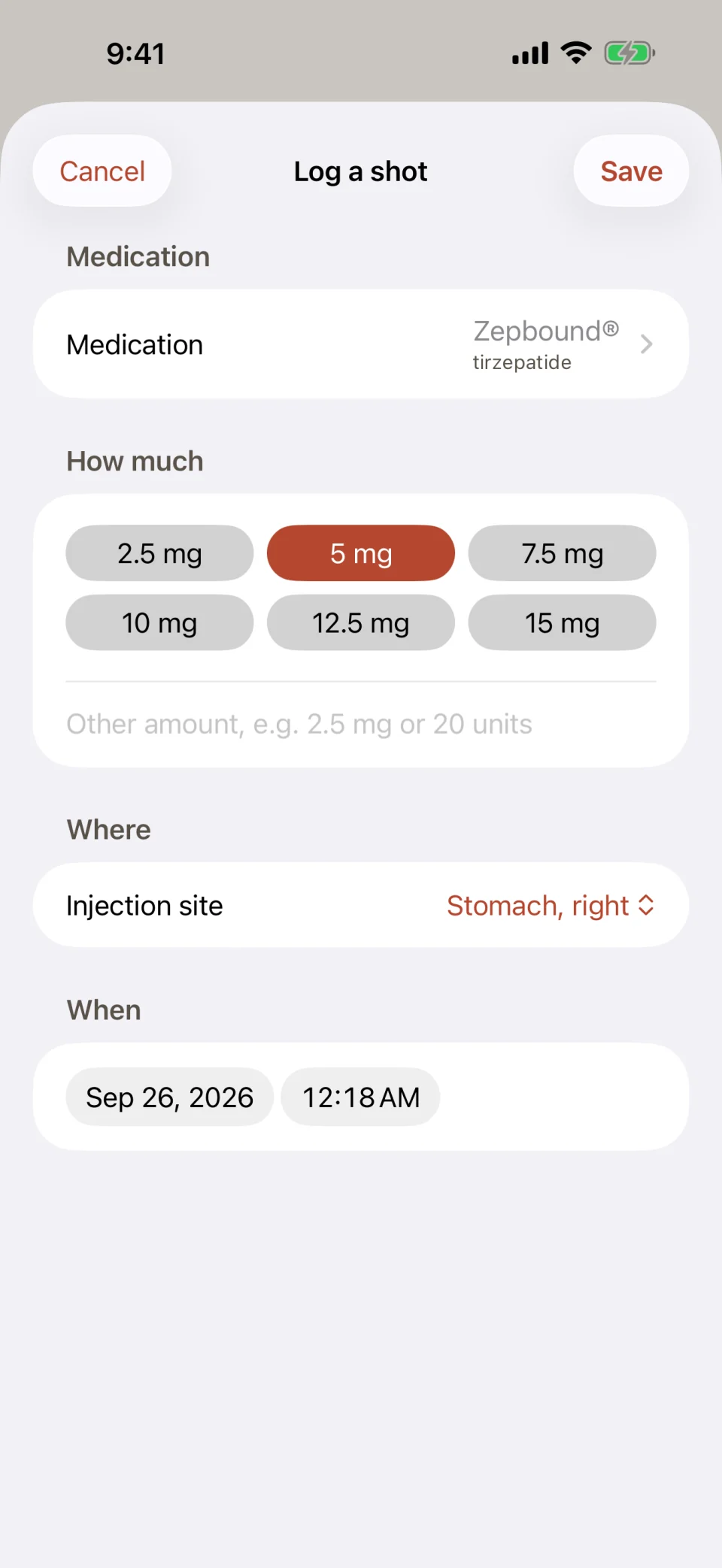
The Log a shot screen in Glutide: Zepbound (tirzepatide) as the medication, dose buttons from 2.5 mg to 15 mg with 5 mg selected, the injection site set to Stomach, right, and the date and time of the dose.
Logging a shot: medication, strength, injection site and time.

Side effects and which day they happen

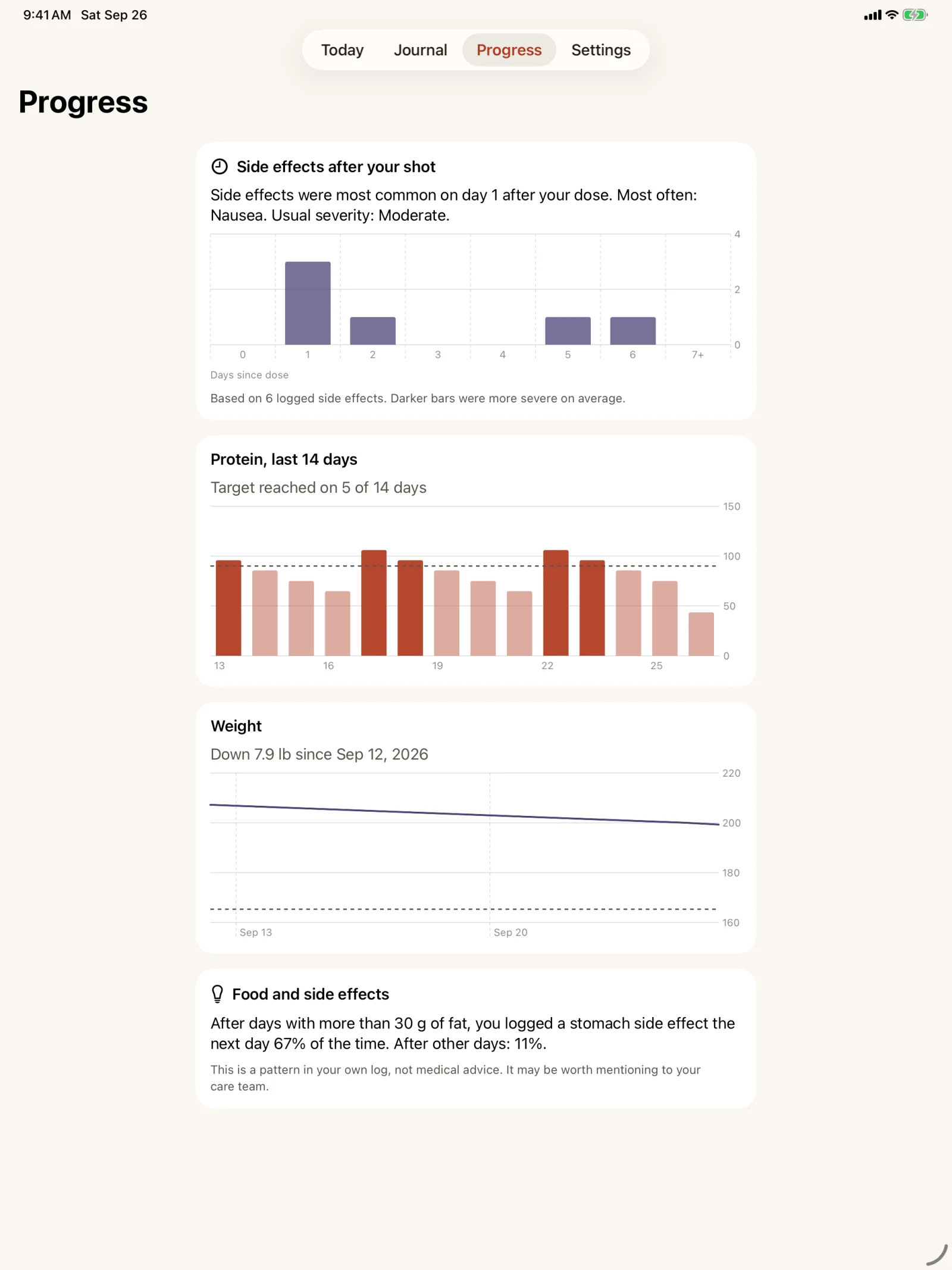
You can log nausea, fatigue, reflux and other side effects with a severity, and you can log your weight. Once you have a few entries, Progress counts your side effects by the number of days since your dose, names the one you logged most often and shows the usual severity.

Progress also compares stomach side effects on the day after a higher-fat day with the day after other days, using only what you logged. For example, after days with more than 30 g of fat you may see “67% of the time” against “11%”. This is a pattern in your own log. It is not medical advice, and it may be worth mentioning to your care team.

The Progress tab in Glutide on an iPad: a bar chart of side effects by days since the dose that is tallest on day 1, a 14-day protein chart with the target reached on 5 days, a weight line chart, and a note comparing stomach side effects after higher-fat days with other days.
Progress on iPad: side effects by days since the dose, protein for 14 days, weight, and the fat and side effects comparison.

What does Glutide send to a server?

Your meals, doses, side effects and weight are stored on your device and are never uploaded. The only thing that leaves your phone is a photo or description that you choose to analyze. This is what happens to it and what else the server keeps.
A photo or description you analyzeIt is sent to our server and analyzed by an AI model running on Cloudflare. It is used to answer that one request. It is not stored after the answer, not used to train models and not linked to your name.
Meals, doses, side effects, weight, water, settingsThey stay on your device. Glutide has no account and no sign-in.
Food searchIt runs on your device. The USDA FoodData Central database is built into the app.
Install identifierA random number made on your device. The server keeps it with your count of free analyses and, if you subscribe, the date your subscription ends. Daily request counts are deleted after two days.
IP addressIt is never stored.
Ads and trackingThere are none. The app contains no advertising and no analytics.
To remove your log, delete the app. If you also want the server’s record of your install identifier deleted, email support@glutide.app. The full text is on the privacy page.

What does it cost?

Tracking is free and stays free. Analyzing a photo or description runs on a server that costs money every time it is used, so that part has a limit.
Doses, side effects, weight, water, food search, charts, insightsFree, with no limit.
Analyzing a meal from a photo or description10 free analyses for each install. A free analysis is as accurate as a paid one. An analysis that fails or finds no food does not count.
Glutide ProUnlimited analysis for everyday use. It is a subscription that you can buy weekly, monthly or yearly. The price for your country is shown in the App Store before you buy. Eligible new subscribers get a free trial.
Daily limitEvery device has a daily fair-use limit on analyses, with or without Pro. Food search is never limited.
ReinstallingThe free analyses belong to the device, so deleting and reinstalling the app does not reset them. Restore Purchases in Settings brings back Pro on the same Apple Account.
CancellingCancel in the Settings app under your name, then Subscriptions, at least 24 hours before the renewal date.

Who makes Glutide?

Glutide is made by Serious Business Software LLC, an independent developer. You can reach us with Send feedback in Settings or at support@glutide.app, and a person reads every message.

Download Glutide

Free download for iPhone and iPad.

Download on the App Store